Start here
Sent by
Your store, live today.
Five steps, in order. Most people get through the first three in about twenty minutes, on their phone.
Today — steps 1 to 3
-
01
Create your Teemdrop account
Teemdrop is the supplier. They hold the products and ship them to your customer for you — you never hold inventory, and you never pay for a product before it sells.
Free to open. Use this button so your account is linked correctly from the start.
Create my account → -
02
Build your store
This is the storefront your customers actually see. StorePilot builds it for you — you answer a few questions instead of designing pages from scratch.
It opens on a free trial, so the store can be built and connected before you decide anything.
Build my store →Don't jump ahead. Do step 1 first — connecting is far easier when the supplier account already exists. -
03
Connect Teemdrop to your store
This is the step people stop at. It's five screens and about three minutes — but skip it and nothing else works, because your store won't know where the products come from or where to send the orders.
-
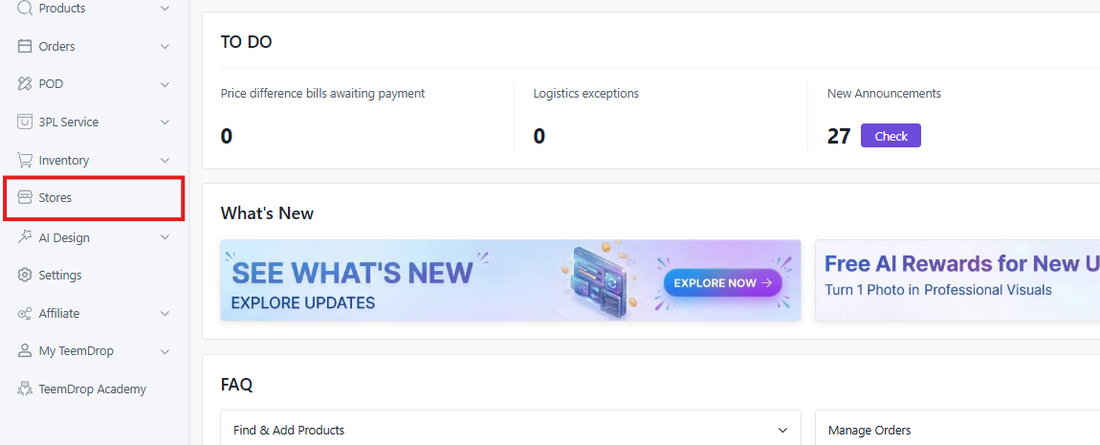
1In TeemDrop, open Stores in the left menu -
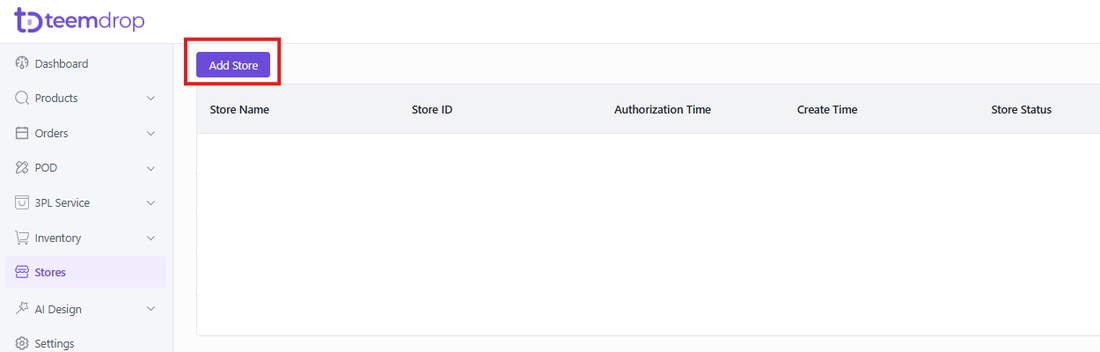
2Click Add Store -
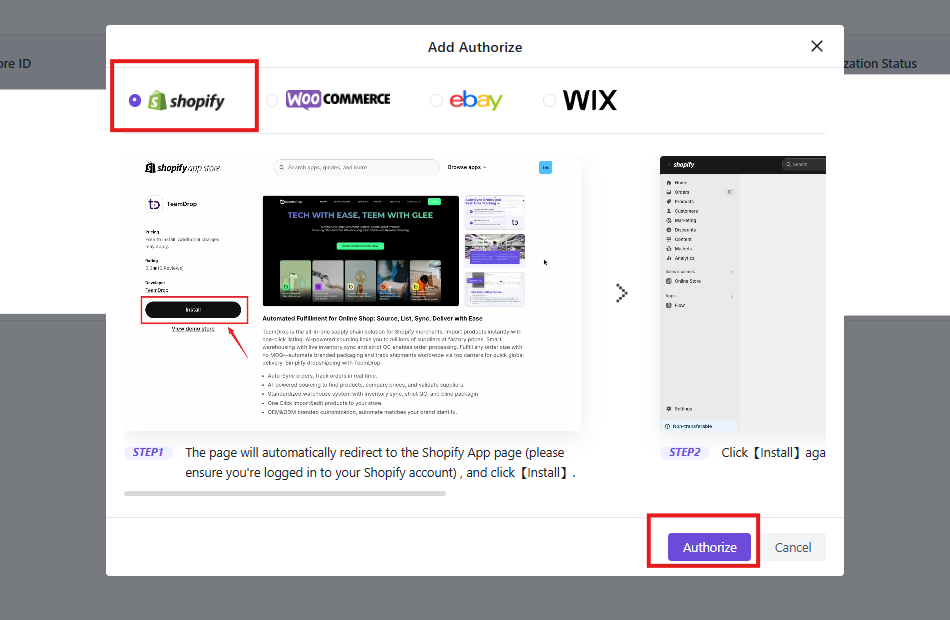
3Choose Shopify , then hitAuthorize -
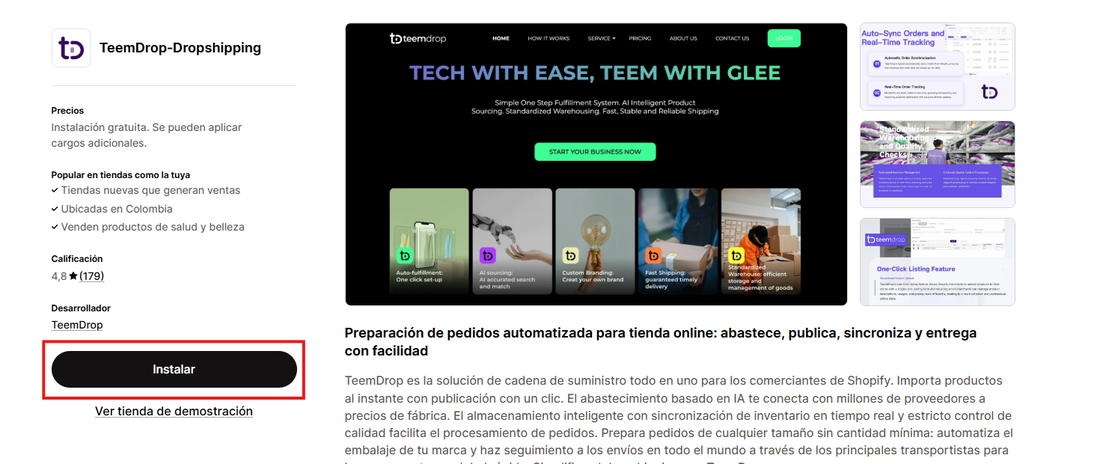
4On the Shopify App Store page, click Install -
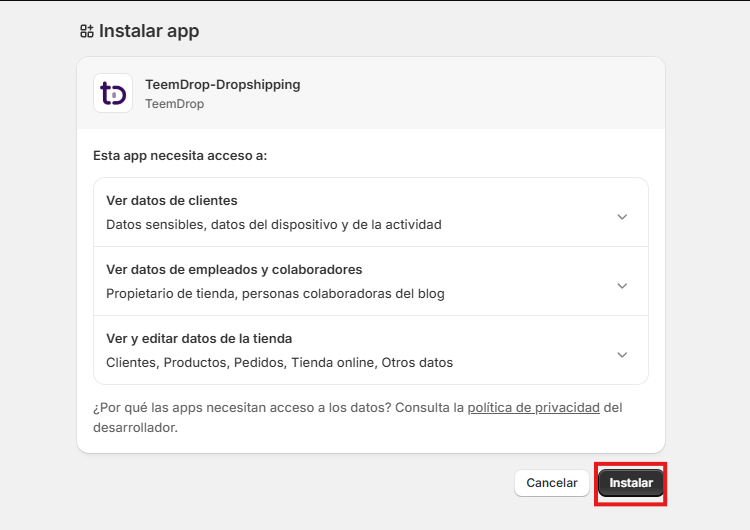
5Check the permissions and click Install again — that's it
If it doesn't connect the first time, don't start over. Reply to the DM that sent you here and say "step 3". It's almost always one setting. -
Once you're connected — steps 4 and 5
-
04
Add your first products
Start with three, not thirty. A store with three products you can explain beats a store with a hundred you can't.
Pick things you could talk about on camera for thirty seconds. That one filter removes most bad product choices before they cost you anything.
How to pick and import → -
05
Get your first order
A live store doesn't bring anyone to it. Traffic does — and the cheapest traffic is you filming the product yourself and posting it.
When an order comes in, you fulfil it from Teemdrop in a couple of taps. You buy the product after the customer has paid you, never before.
Getting your first traffic →
Before you ask
Do I pay for products upfront?
No. The customer pays you first, then you order the product from Teemdrop. That's the whole reason this works without savings behind it.
How long does shipping take?
It depends on the product and where your customer is. Check the current time for that specific product inside your Teemdrop dashboard — it's the only number that's actually accurate, and it's right there before you list anything.
Do I need to show my face?
No. Plenty of stores run on product footage, screen recordings and voiceovers. It's one option among several, not a requirement.
Can I do all of this from my phone?
Yes. Steps 1 to 3 work fine on a phone. Step 4 is a little easier on a laptop if you have one, but it isn't required.
I got stuck on a step.
Reply to the DM that sent you here with the step number. Just the number is enough.
Stuck anywhere?
Reply to the DM that sent you here with the step number. Someone will actually answer.